Car Scanner case study
Engineering case study · Computer vision on self-hosted infrastructure

Photograph a car. Get the model and the price.

A complete vehicle-identification system running as a single self-hosted workflow: a camera page in the browser, a vision model that names the car, a 170-vehicle inventory database, a public dashboard and a protected admin - no separate backend, no app, no cloud server. Built in one evening, and improved by one instructive failure.

~9sphoto to answer
170vehicles in stock
24workflow nodes
0cloud servers
The interface is in Hebrew - the system was built for a live demonstration to a Hebrew-speaking audience. The captions below explain each screen, and the architecture is language-independent.
Mobile flow

From camera to answer

There is nothing to install. A web page served by the workflow itself opens the phone's rear camera directly through <input capture="environment">. The photograph is resized to 1280px in a canvas on the device before upload - which cuts both transfer time on mobile data and the token cost of the vision call - then posted as base64 to a webhook. The response comes back as JSON and is rendered in the same page.

Scanner entry screen with a single camera button

// the entry point: one button, opening the camera

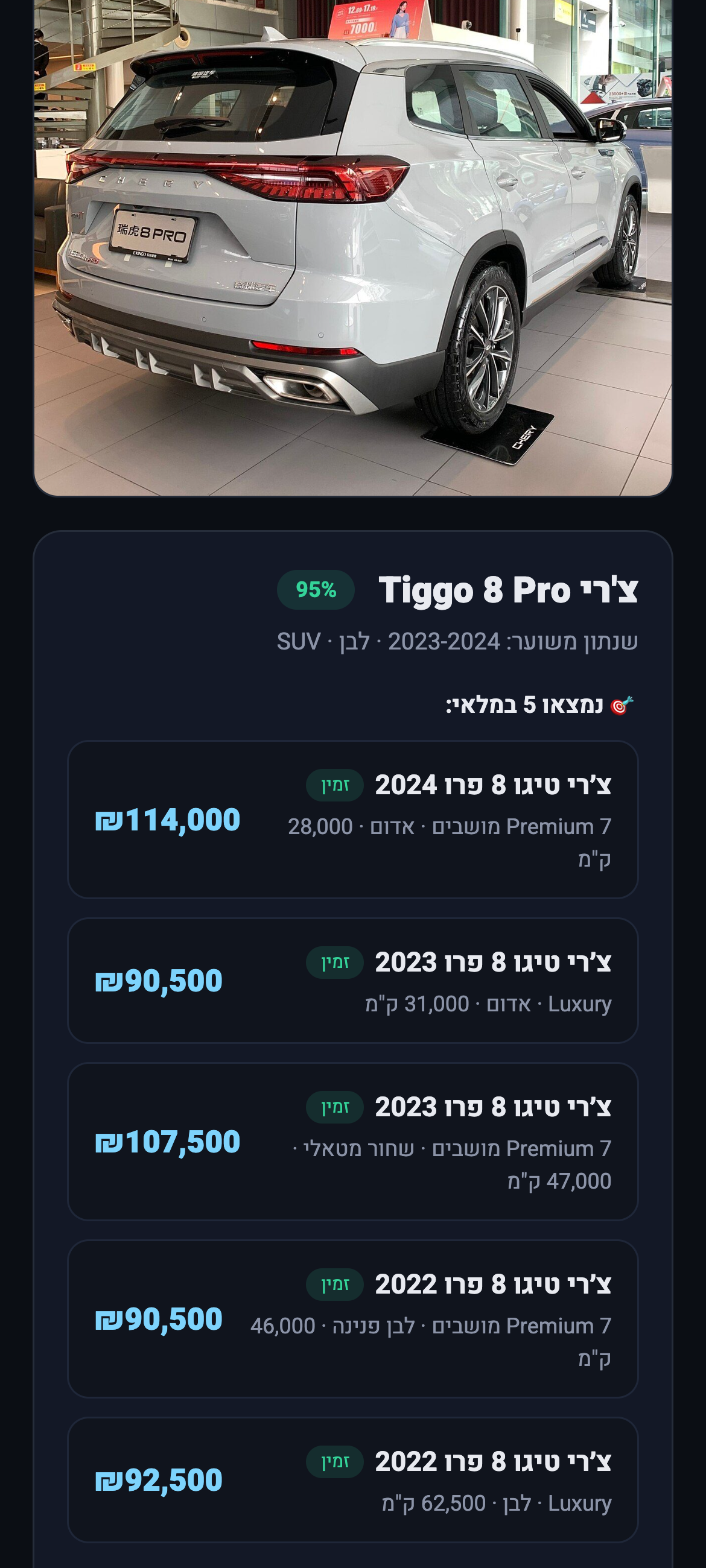
Result screen identifying a Chery Tiggo 8 Pro with five matching units in stock

// a real scan: Chery Tiggo 8 Pro, 95% confidence, five units found in stock with prices
The pipeline

Scanning, inventory and administration in one workflow

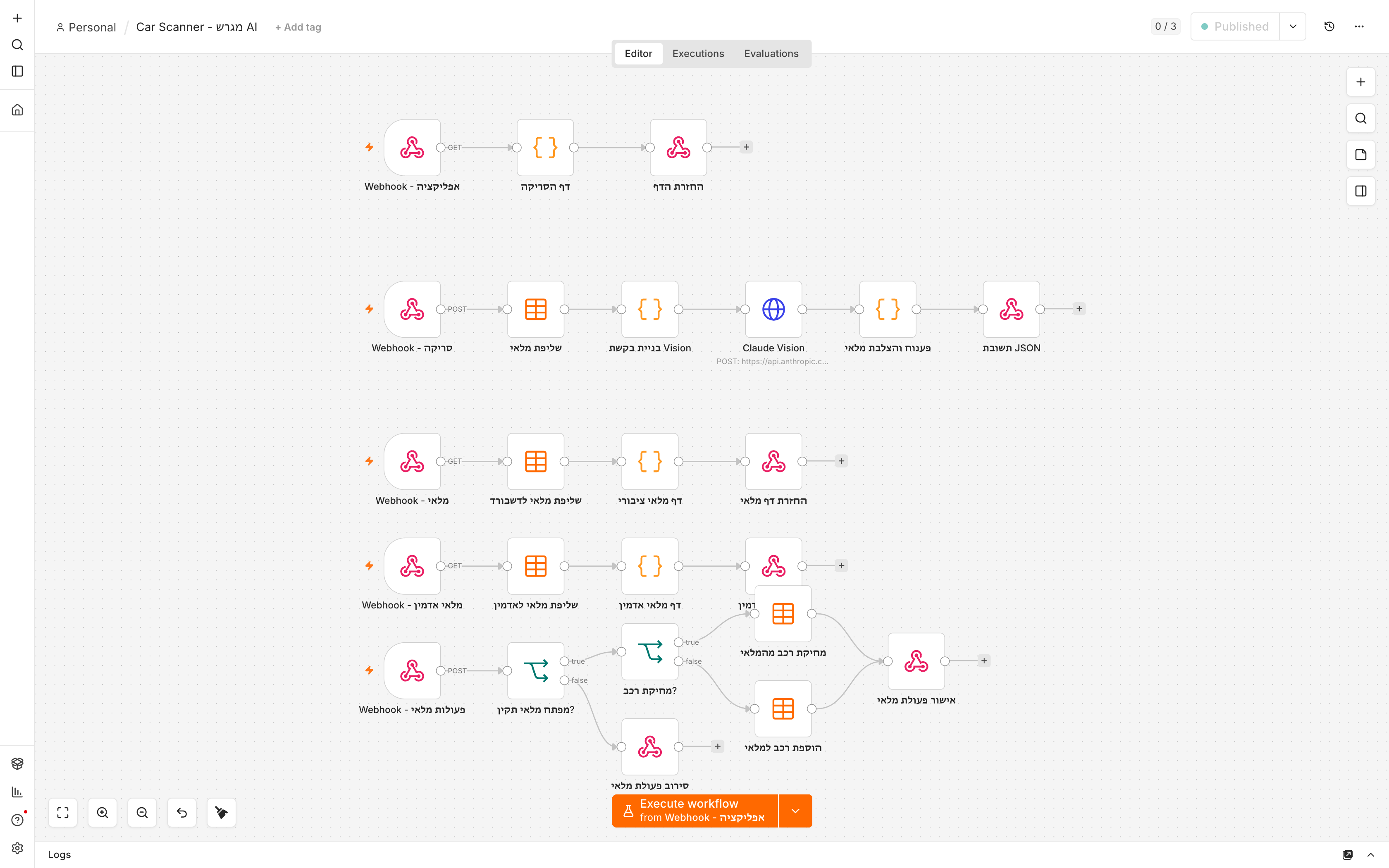
The workflow canvas showing five separate entry points { } source

// 24 nodes across 5 entry points: the scanner page, the scan API, the public inventory dashboard, the admin page, and the guarded write endpoint · click to open the exported workflow - credentials and keys stripped, importable into any n8n instance

camera page → POST base64 → data table catalog → vision model (temp 0) → identify → catalog_match → fuzzy match → JSON → render
01 · CAPTUREServer-rendered camera pageThe page is an HTML string returned by a webhook response - no static hosting involved. Resizing happens client-side via canvas.toDataURL('image/jpeg', 0.82).
02 · CONTEXTCatalog before identificationThe inventory is read from the data table and reduced to a unique make/model list, injected into the prompt so any match returns in the exact spelling the database uses.
03 · VISIONDirect vision callAn HTTP request carrying the image as base64, with temperature: 0 for repeatable identification and a forced JSON contract so the response shape is never guesswork.
04 · MATCHTwo-stage matchingHonest identification first, catalog lookup second - see the lesson below - with normalised-spelling fuzzy matching as a fallback for Hebrew transliterations.
05 · INVENTORYDashboard and adminA public read-only inventory page with live search and an embedded QR to the scanner; a key-protected admin page that can add and remove vehicles.
06 · DATABuilt-in data table170 vehicles across 8 columns, stored in n8n's own data table. Bulk seeding through a single insert call with an array of rows. No external database.
Prompt engineering

The Chery that was confidently an MG

The bug that taught the most

The first version of the prompt asked the model to identify the car and return the make and model using the spellings from the catalog. A Chery Tiggo 8 - a brand common on local roads and absent from that catalog - came back as an MG HS at 95% confidence. Both wear a diamond-mesh grille, and a model handed a closed list is pulled toward it. The confidence score is the dangerous part: the system was not hesitating. It was wrong, and certain.

// v1 — identification and matching in one instruction "Return make and model using the spellings from the catalog" { "make": "MG", "model": "HS", "confidence": 95 } // wrong, and sure of it
// v2 — two stages, explicitly separated "Step 1: identify honestly, with no list in front of you. Step 2: catalog_match only if it truly exists, else null. Never round to a lookalike." { "make": "Chery", "model": "Tiggo 8 Pro", "confidence": 95, "catalog_match": { "Chery", "Tiggo 8 Pro" } }

The generalisable rule: give a model a closed list and it will be drawn to it, even when the correct answer lies outside. The fix was not a better list - it was separating "what do you see?" from "which of these do we carry?", and explicitly authorising null as an answer. Once identification stopped competing with matching, both got better.

Two smaller changes shipped with it. temperature: 0, so the same photograph always produces the same identification. And recognition cues for the brands a Western-trained model tends to under-weight - Chery, Omoda, Jaecoo, Geely, Haval, BYD, MG, Skywell, Zeekr - written as visual tells (badge shape, grille pattern) rather than as a list of names. Twenty Chinese-market vehicles were added to the inventory at the same time, because a local dealership in 2026 without them is not a credible dataset.

Re-running the same photograph after the change returned Chery Tiggo 8 Pro at 95%, with the model citing the oval badge, the diamond-mesh grille and the connected rear lamps - and five matching units in stock.

Inventory operations

Dashboard, search, and a guarded admin

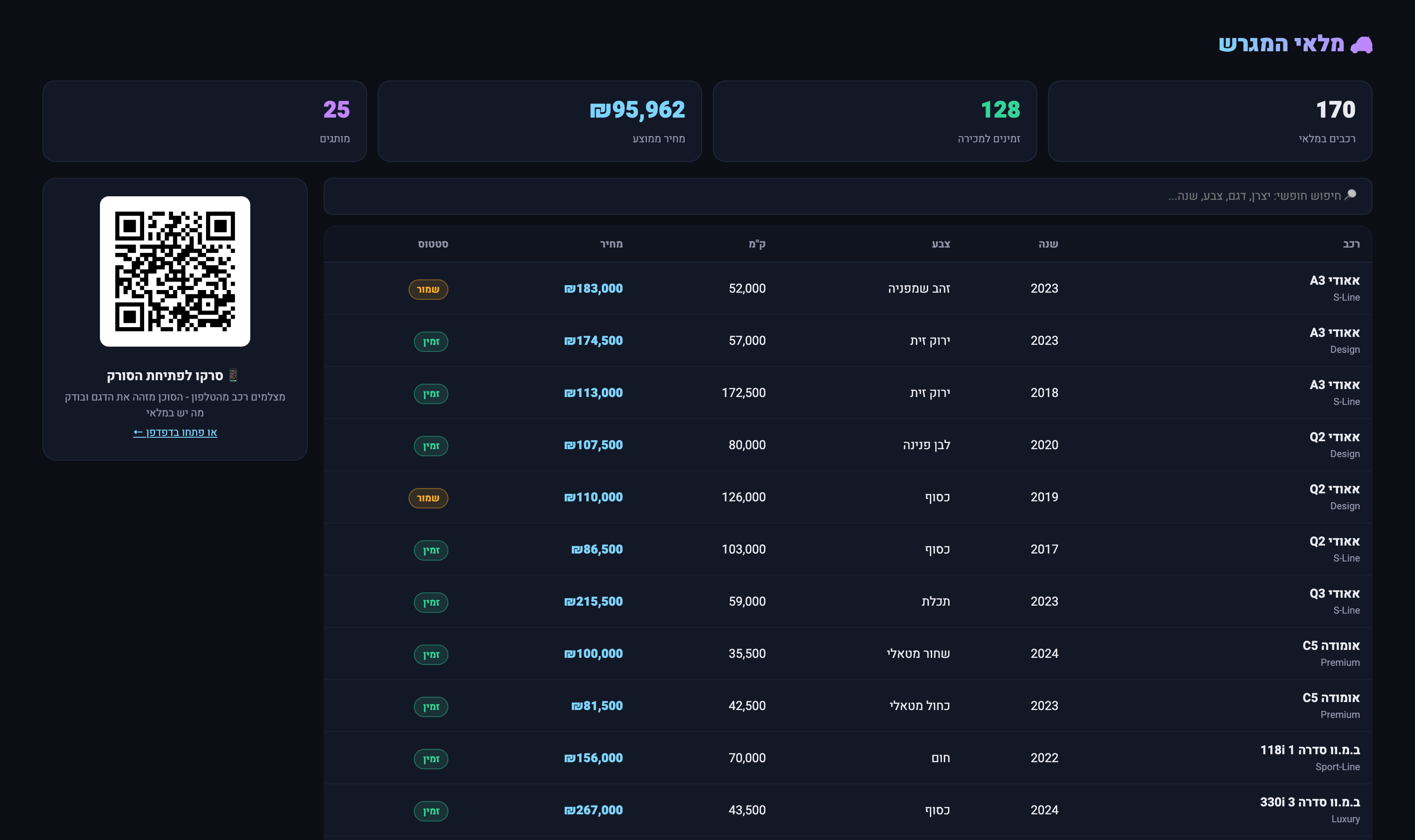
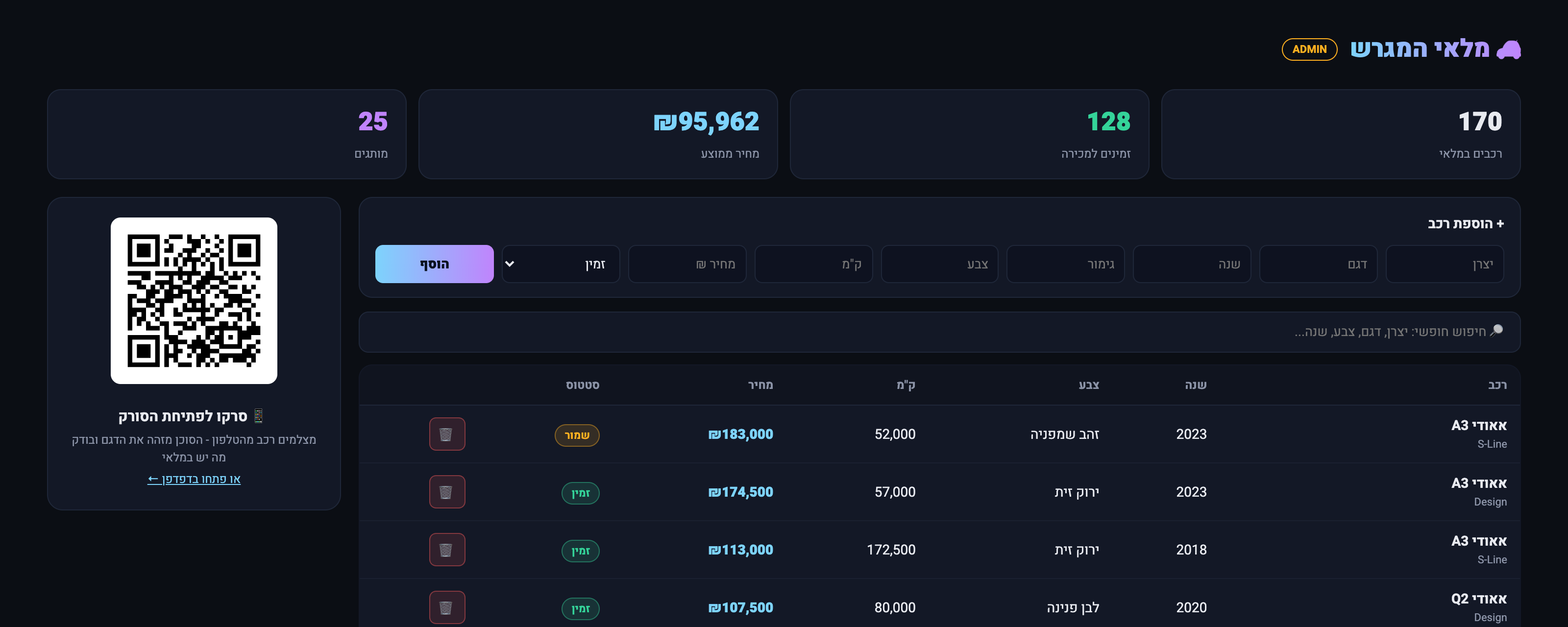
The stock is managed from a single page: live statistics, client-side free-text search across every field, and an embedded QR code that opens the scanner on a phone - so during a demonstration the audience can scan the screen and try it themselves. The admin variant adds a form to add a vehicle and a delete control on each row. Both hit one authenticated endpoint that routes between insert and delete, with the key checked server-side and a 403 returned without it.

Inventory dashboard with statistics, search, vehicle table and QR code

// the public dashboard - read-only, with the QR that opens the scanner

Admin view with an add-vehicle form and per-row delete controls

// the admin view: add and remove stock, reachable only with the key

Engineering notes

Decisions and trade-offs

A second system on the same infrastructure. The same self-hosted instance already runs an automated lead-handling pipeline. The marginal cost of an entirely different product was one workflow and one data table.
Public by design, guarded where it matters. The scanner and dashboard are deliberately open; anything that writes to the database requires a key checked on the server, not in the browser.
Cents per scan. One vision call per photograph, with device-side resizing keeping every image in the cheap end of the token range.
Built in an evening. Including the 170-vehicle dataset, both dashboards, the identification fix and end-to-end verification against real photographs.
OrchestrationSelf-hosted n8n · a single workflow with five entry points · pages served directly from webhook responses
VisionClaude Sonnet 4.5 over HTTP · temperature 0 · forced JSON contract · two-stage prompt separating identification from catalog matching
Front endServer-rendered HTML and vanilla JavaScript · no framework, no build step
Datan8n data table · 170 rows · bulk insert API
NetworkPrivate tunnel with public TLS · no ports opened on the host
The inventory is generated for this project and does not represent a real dealership. Every identification shown here is a genuine model response to the photograph beside it.